---
title: Kanoa Inventory
description: Kanoa Inventory manages parts, stock levels, storerooms, bins, suppliers, inventory transactions, stocking policies, and equipment BOMs in Kanoa MES.
image: https://kanoa.ai/hubfs/kanoaInventoryHero.png
---
[](https://kanoa.ai/?hsLang=en)
[](https://kanoa.ai/?hsLang=en)
- Kanoa MES
- [Kanoa MES Platform](https://kanoa.ai/kanoa-mes-overview)
- [Kanoa Ops](https://kanoa.ai/kanoa-ops)
- [Kanoa Trace](https://kanoa.ai/kanoa-trace)
- [Kanoa Quality](https://kanoa.ai/kanoa-quality)
- [Kanoa Maintenance](https://kanoa.ai/kanoa-maintenance)
- [Kanoa Inventory](https://kanoa.ai/kanoa-inventory)
- [Implementation Assurance](https://kanoa.ai/implementation-assurance-expert-guidance-for-successful-mes-kanoa)
- [Powered by Ignition](https://kanoa.ai/powered-by-ignition)
- [Frequently Asked Questions](https://kanoa.ai/faq)
- [Pricing](https://kanoa.ai/pricing)
- Resources
- [Live Demo](http://demo.kanoa.ai/data/perspective/client/kanoaDemo/)
- [Downloads](https://kanoa.ai/downloads)
- [Blog](https://kanoa.ai/kanoa-blog)
- [Partners](https://kanoa.ai/become-a-kanoa-partner)
- [Systems Integrators](https://kanoa.ai/systems-integrator-partners)
- [Friends of Kanoa](https://kanoa.ai/partners)
- [Become a Partner](https://kanoa.ai/become-a-kanoa-partner)
- [Kanoa on YouTube](https://www.youtube.com/@kanoa_ai)
- [About](https://kanoa.ai/about)
- Support
- [Documentation](https://docs.kanoa.ai/)
- [Support Portal](https://kanoa.freshdesk.com/support/login)
- [Support Policy](https://kanoa.ai/hubfs/Documents/Kanoa%20Support%20Policy%2020240618.pdf)
- [Contact](https://kanoa.ai/contact)
More results
Download Kanoa
Download Kanoa
- Kanoa MES
- [Kanoa MES Platform](https://kanoa.ai/kanoa-mes-overview)
- [Kanoa Ops](https://kanoa.ai/kanoa-ops)
- [Kanoa Trace](https://kanoa.ai/kanoa-trace)
- [Kanoa Quality](https://kanoa.ai/kanoa-quality)
- [Kanoa Maintenance](https://kanoa.ai/kanoa-maintenance)
- [Kanoa Inventory](https://kanoa.ai/kanoa-inventory)
- [Implementation Assurance](https://kanoa.ai/implementation-assurance-expert-guidance-for-successful-mes-kanoa)
- [Powered by Ignition](https://kanoa.ai/powered-by-ignition)
- [Frequently Asked Questions](https://kanoa.ai/faq)
- [Pricing](https://kanoa.ai/pricing)
- Resources
- [Live Demo](http://demo.kanoa.ai/data/perspective/client/kanoaDemo/)
- [Downloads](https://kanoa.ai/downloads)
- [Blog](https://kanoa.ai/kanoa-blog)
- [Partners](https://kanoa.ai/become-a-kanoa-partner)
- [Systems Integrators](https://kanoa.ai/systems-integrator-partners)
- [Friends of Kanoa](https://kanoa.ai/partners)
- [Become a Partner](https://kanoa.ai/become-a-kanoa-partner)
- [Kanoa on YouTube](https://www.youtube.com/@kanoa_ai)
- [About](https://kanoa.ai/about)
- Support
- [Documentation](https://docs.kanoa.ai/)
- [Support Portal](https://kanoa.freshdesk.com/support/login)
- [Support Policy](https://kanoa.ai/hubfs/Documents/Kanoa%20Support%20Policy%2020240618.pdf)
- [Contact](https://kanoa.ai/contact)
Download Kanoa
###### INVENTORY MANAGEMENT FOR KANOA MES
# Kanoa Inventory
Manage parts, raw materials, finished goods, stock levels, storerooms, suppliers, and equipment bills of materials inside Kanoa MES. Kanoa Inventory gives manufacturers and Ignition teams a structured foundation for understanding what is in stock, where it is stored, and how inventory moves across the plant.
Kanoa Inventory is an add-on solution and requires [Kanoa Ops](https://kanoa.ai/kanoa-ops?hsLang=en).
[Get Pricing](https://kanoa.ai/pricing?hsLang=en)[Talk to Sales](https://kanoa.ai/contact?hsLang=en)
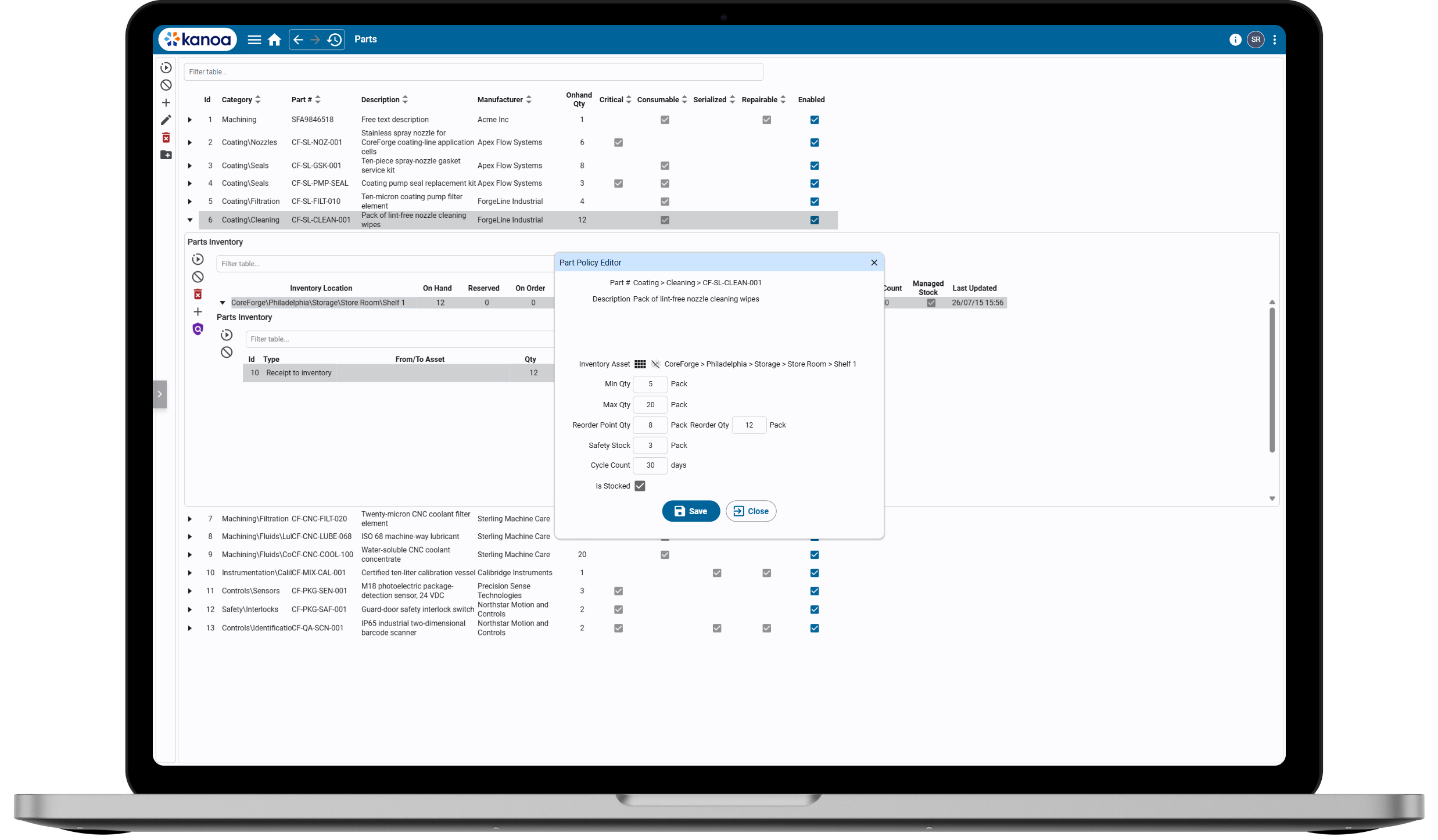
Why Kanoa Inventory?
## Inventory management built for the plant
Plant inventory is more than a list of part numbers. Teams need to know what is available, where it is stored, which equipment uses it, and how quantities changed over time.
Kanoa Inventory brings those workflows into Kanoa MES. It connects parts, locations, policies, transactions, suppliers, and equipment context in the same Ignition-powered environment used for production operations.
### Know what you have and where it is
Track inventory by storeroom and bin, with visibility into on-hand, reserved, on-order, and available quantities where that information is maintained.
### Apply the right stocking rules
Define location-specific minimums, maximums, reorder points, reorder quantities, safety stock, and cycle-count frequency for the parts you actively manage.
### Preserve inventory history
Record receipts, issues, transfers, returns, and adjustments with the quantity, location, reference, cost-center, supplier, and user context available for each movement.
---
### Kanoa Inventory Features
---
#### Parts Catalog
Create a structured catalog for raw materials, finished goods, spare parts, repairable components, serialized items, and consumables.
Parts Catalog
#### Part Identification and Classification
Maintain internal and manufacturer part numbers, descriptions, categories, manufacturers, default units of measure, and flags for critical, repairable, serialized, and consumable parts.
Part Identification and Classification
#### Storerooms and Bins
Represent storerooms as inventory assets in the Kanoa MES asset hierarchy, then organize stock into physical bins such as shelves, racks, drawers, or other site-defined locations.
Storerooms and Bins
#### Stock Visibility by Location
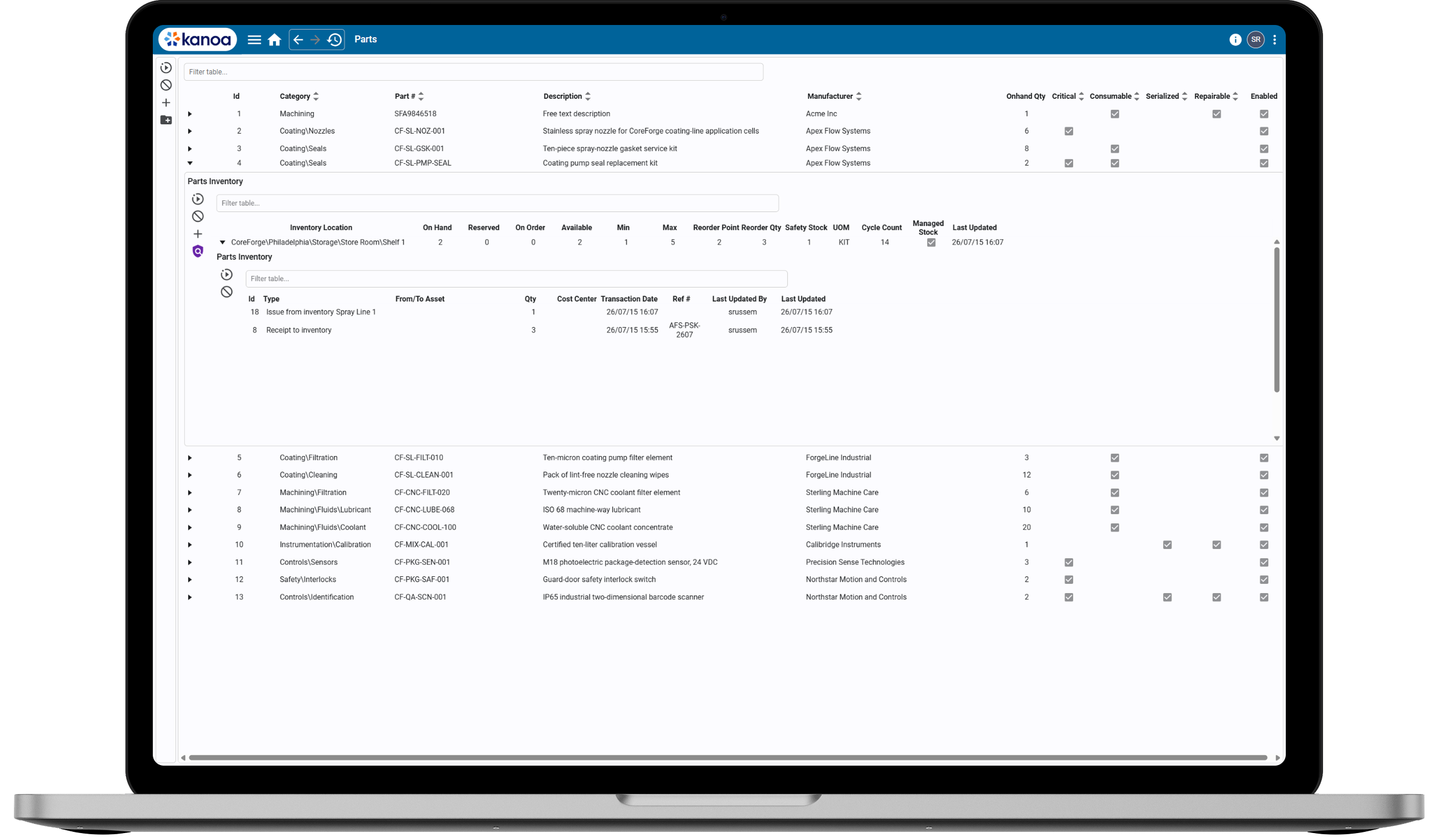
Review on-hand, reserved, on-order, and available quantities across inventory locations, along with the stocking policy and unit of measure associated with each part.
Stock Visibility by Location
#### Stocking Policies
Define minimum and maximum quantities, reorder points, reorder quantities, safety stock, cycle-count intervals, and managed-stock status for each part and location.
Stocking Policies
#### Inventory Transactions
Record receipts, issues, transfers, returns, and positive or negative adjustments so stock changes are captured as structured transactions.
Inventory Transactions
#### Transaction History
Review the movement history for a part, including transaction type, quantity, associated assets, cost center, reference number, date, and user context where provided.
Transaction History
#### Suppliers and Manufacturers
Maintain the supplier and manufacturer reference information needed to identify parts and support receiving and inventory workflows.
Suppliers and Manufacturers
#### Units of Measure and Cost Centers
Standardize how parts are measured and associate inventory movements with the appropriate operational or financial reference context.
Units of Measure and Cost Centers
#### Equipment Bills of Materials
Associate parts with an equipment model or a specific asset instance so teams can identify the spares and components related to plant equipment.
Equipment Bills of Materials
#### Maintenance Parts Usage
When Kanoa Maintenance is also licensed, issue parts from Kanoa-managed inventory to maintenance work-order events and connect consumption with the asset and maintenance history.
Maintenance Parts Usage
#### Configurable and Extensible Through Ignition
Use Kanoa's documented system functions and Ignition development tools to support plant-specific inventory workflows, integrations, reports, and interfaces.
Configurable and Extensible Through Ignition
## Put inventory in the context of your plant
Kanoa Inventory builds on the asset hierarchy and operational foundation established in Kanoa Ops. Storerooms and inventory locations become part of the same plant structure used to organize equipment, lines, areas, and sites across Kanoa MES.
That shared foundation helps teams understand not only how much inventory is available, but where it is stored and which plant equipment it supports. Kanoa Inventory extends the Ops asset model with parts, bins, stocking policies, transactions, suppliers, and equipment bills of materials—all within the same Ignition-powered environment.
[Explore Kanoa Ops](https://kanoa.ai/kanoa-ops?hsLang=en)
[](https://kanoa.ai/kanoa-ops?hsLang=en)
Product Tour
## See Kanoa Inventory in action
Explore how Kanoa Inventory helps teams organize parts, understand stock across locations, manage stocking policies, and preserve inventory history.
### Create a shared definition of every inventory item
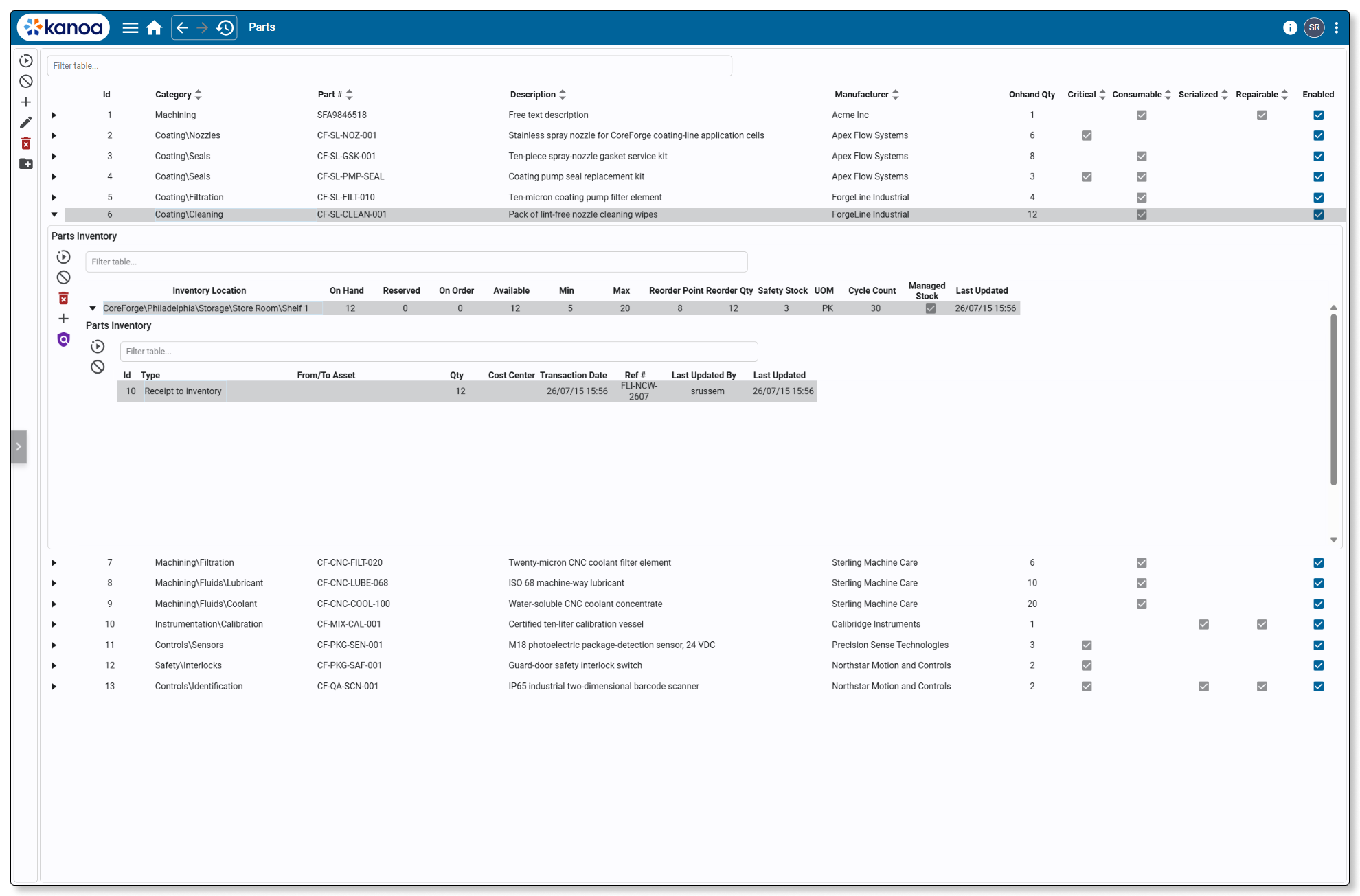
Build a structured catalog with part numbers, categories, descriptions, manufacturers, and default units of measure. Classification flags help teams identify critical, consumable, repairable, and serialized items while keeping essential part information available in one place.
### Know what you have and where it is stored
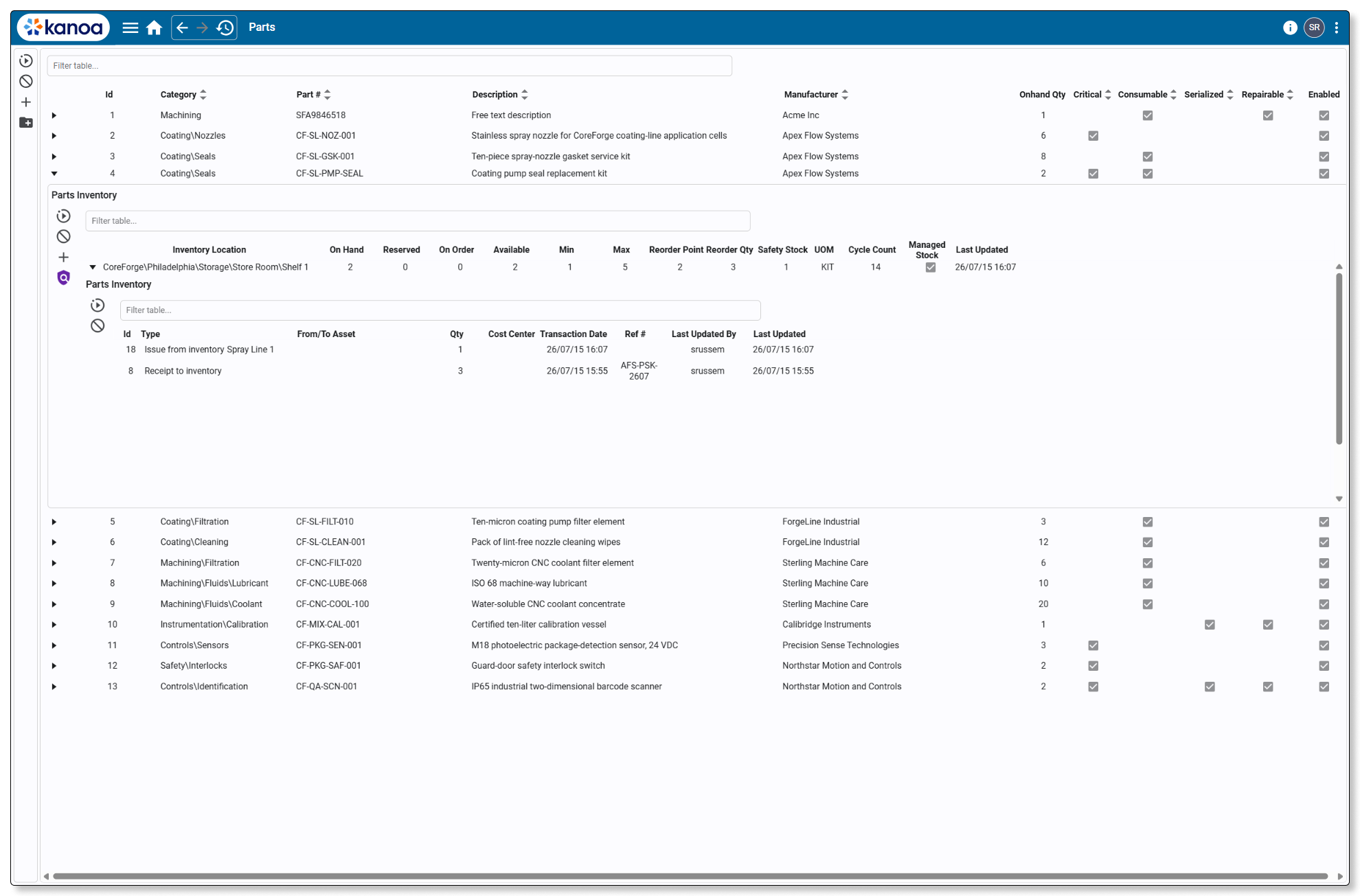
Expand a part to review its inventory across storerooms and bins. See on-hand, reserved, on-order, and available quantities alongside the unit of measure, stocking policy, and managed-stock status maintained for each location.
Transaction history provides the supporting record of how quantities changed over time.
### Set inventory rules where the stock is actually held
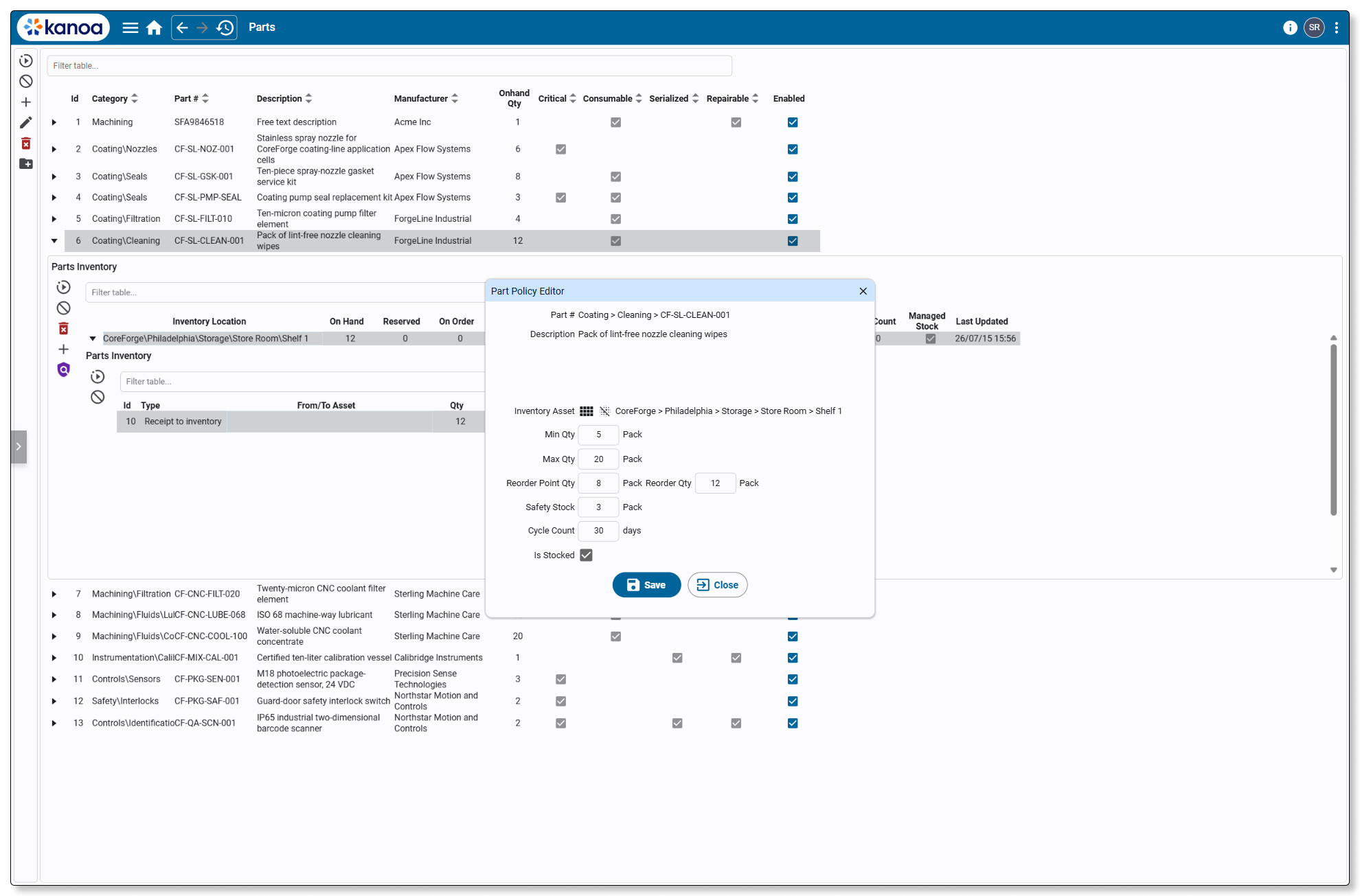
Different parts and locations need different stocking strategies. Define minimum and maximum quantities, reorder points, reorder quantities, safety stock, cycle-count frequency, and managed-stock status for a specific part at a specific inventory location.
These policies help teams identify inventory that may require attention without implying that reaching a threshold automatically submits a purchase order.
### Preserve the reason every quantity changed
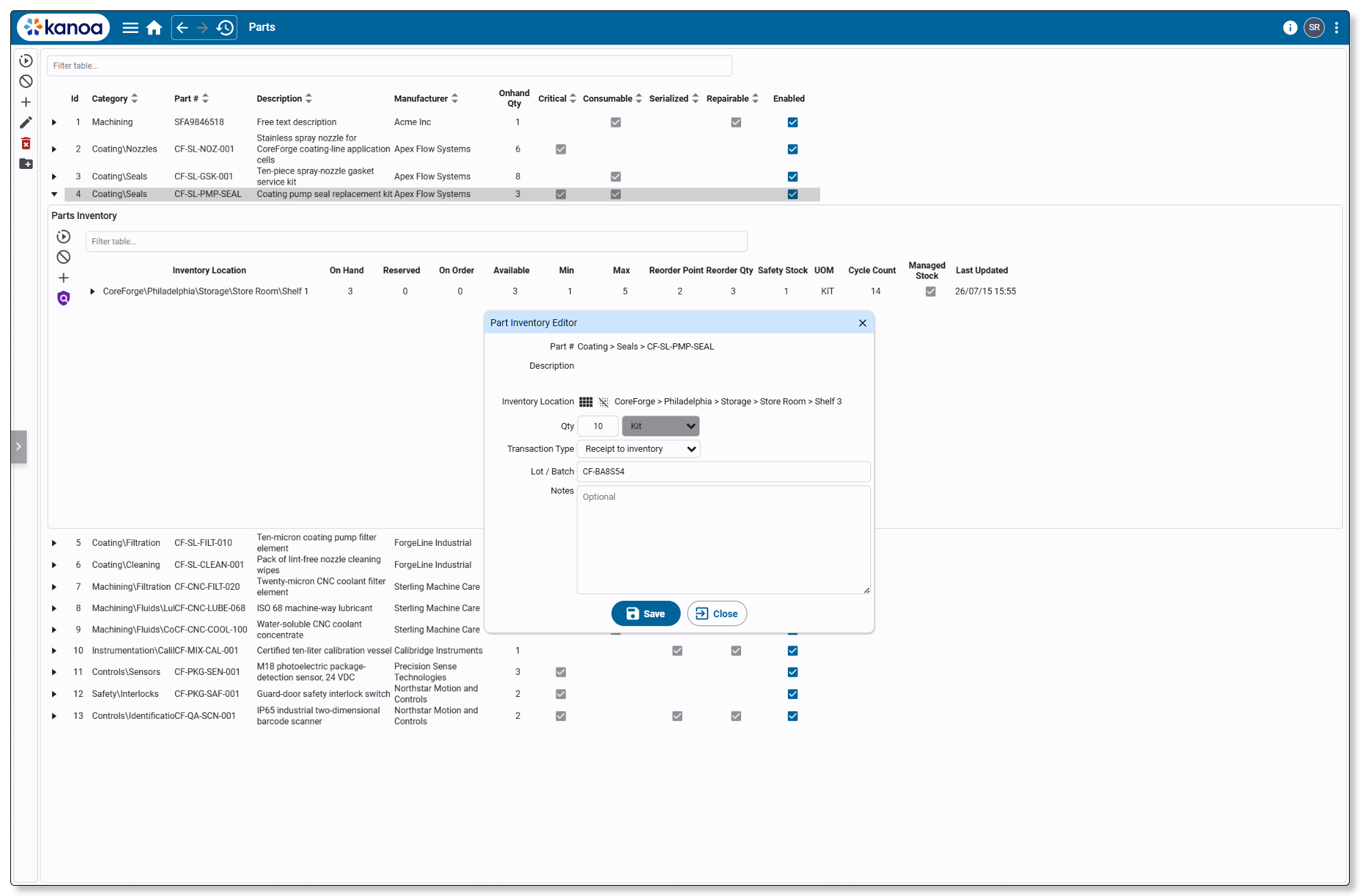
Record receipts, issues, transfers, returns, and adjustments as structured inventory transactions. Capture relevant context such as quantity, inventory location, supplier, cost center, reference number, related asset, lot or batch reference, notes, transaction date, and user where applicable.
Corrections can be recorded through adjustment transactions, preserving the movement history instead of rewriting it.
- Organize Parts
- See Stock by Location
- Apply Stocking Policies
- Record Inventory Movements
- Organize Parts
- See Stock by Location
- Apply Stocking Policies
- Record Inventory Movements
Inventory and Traceability
## Inventory visibility and production traceability answer different questions
Kanoa Inventory and [Kanoa Trace](https://kanoa.ai/kanoa-trace?hsLang=en) both work with material context, but they provide different kinds of visibility. Use Kanoa Inventory to manage stock and plant inventory workflows. Add Kanoa Trace when production genealogy and deeper work-in-progress traceability are also required.
Kanoa Inventory
Kanoa Trace
Primary Question
What do we have, how much is available, and where is it stored?
What went into this product, what did it become, and how are the outputs related?
Primary focus
Parts, quantities, storerooms, bins, suppliers, stocking policies, and inventory transactions
Lots, serials, inputs, outputs, transformations, routes, and trace events
Best suited for
Raw materials, finished goods, spare parts, consumables, and plant storeroom workflows
Production genealogy, transformation history, investigations, and work-in-progress traceability
Movement visibility
Receipts, issues, transfers, returns, and adjustments
Material consumption, production events, transformations, and genealogy relationships

##### Explore Kanoa Trace
The two Solutions can be used together when manufacturers need both plant inventory management and detailed production genealogy.
[Explore Kanoa Trace](https://kanoa.ai/kanoa-trace?hsLang=en)
## Connect parts usage with maintenance history
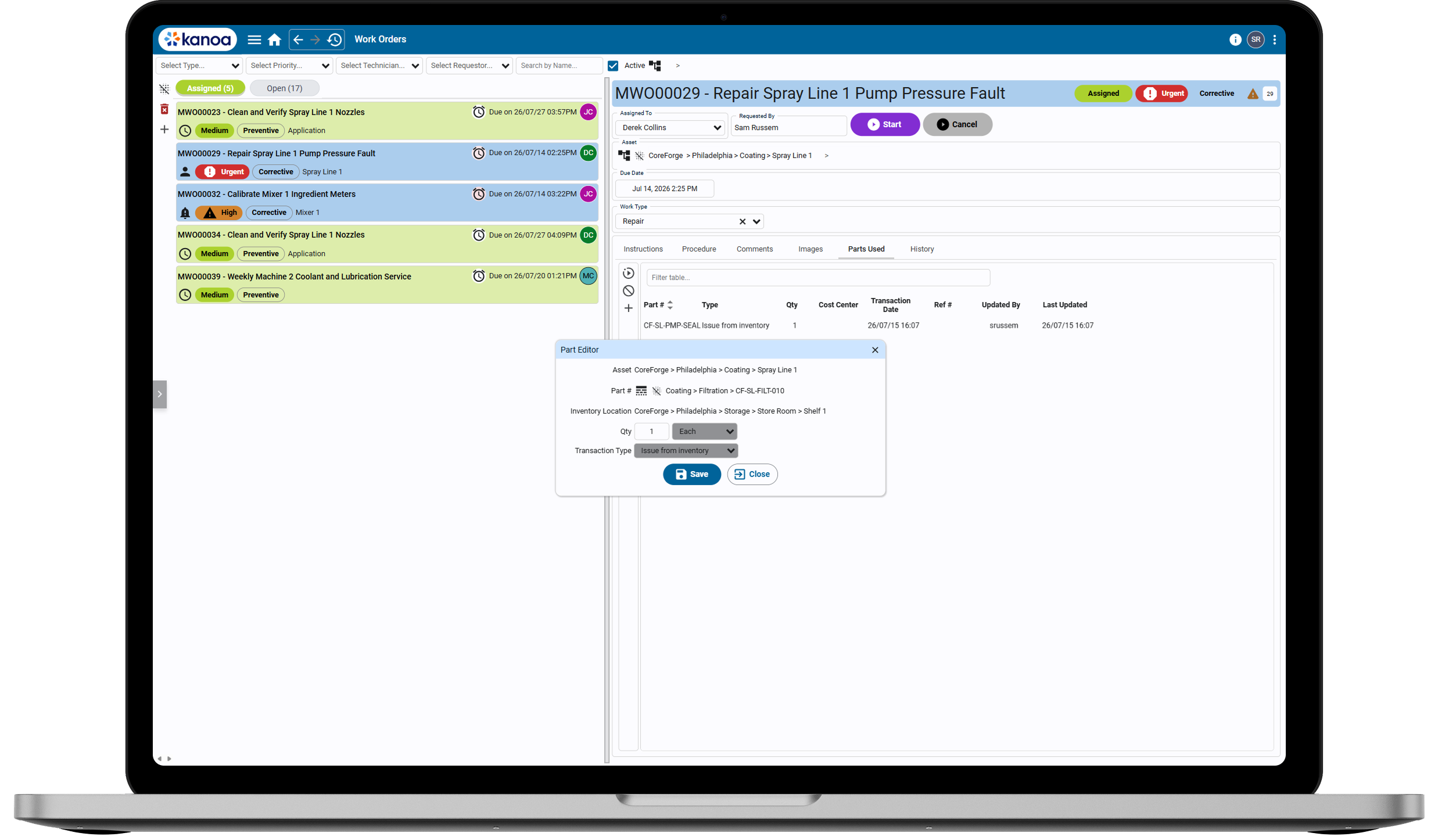
When Kanoa Maintenance is also licensed, technicians can issue parts from Kanoa-managed inventory directly to maintenance work-order events.
The resulting inventory transaction stays connected to the maintained asset, technician, quantity, and maintenance activity where the part was used. This gives maintenance and storeroom teams a clearer record of parts consumption while keeping inventory and work management inside Kanoa MES.
[Explore Kanoa Maintenance](https://kanoa.ai/kanoa-maintenance?hsLang=en)
[](https://kanoa.ai/kanoa-maintenance?hsLang=en)
## Ready to bring plant inventory into Kanoa MES?
Organize parts, understand stock across plant locations, apply location-specific stocking policies, and preserve inventory movement history in one Ignition-powered MES environment.
[Schedule a Demo](https://kanoa.ai/contact-schedule-a-demo?hsLang=en) [Get Pricing](https://kanoa.ai/pricing?hsLang=en)
## About Kanoa
Creating Ignition-powered MES solutions that empower manufacturers and drive Digital Transformation
[Kanoa MES](https://kanoa.ai/kanoa-mes-overview?hsLang=en)
- [Kanoa Ops](https://kanoa.ai/kanoa-ops?hsLang=en)
- [Kanoa Trace](https://kanoa.ai/kanoa-trace?hsLang=en)
- [Kanoa Quality](https://kanoa.ai/kanoa-quality?hsLang=en)
- [Kanoa Maintenance](https://kanoa.ai/kanoa-maintenance?hsLang=en)
- [Kanoa Inventory](https://kanoa.ai/kanoa-inventory)
- [Implementation Assurance](https://kanoa.ai/implementation-assurance-expert-guidance-for-successful-mes-kanoa?hsLang=en)
- [Powered by Ignition](https://kanoa.ai/powered-by-ignition?hsLang=en)
- [Pricing](https://kanoa.ai/pricing?hsLang=en)
Resources
- [Live Demo](https://demo.kanoa.ai)
- [Read our Blog](https://kanoa.ai/kanoa-blog?hsLang=en)
- [Downloads](https://kanoa.ai/downloads?hsLang=en)
- [Partners](https://kanoa.ai/partners?hsLang=en)
Support
- [Documentation](http://docs.kanoa.ai)
- [Support Portal](https://kanoa.freshdesk.com/)
- [Support Policy](https://kanoa.ai/hubfs/Documents/Kanoa%20Support%20Policy%2020240618.pdf?hsLang=en)
Company
- [About us](https://kanoa.ai/about?hsLang=en)
- [Contact us](https://kanoa.ai/contact?hsLang=en)
Copyright © 2026 Kanoa, Inc.